
An area's sheet: resources, activities and quirks
- zone
- The area to look up. Without it, the one you are standing in.
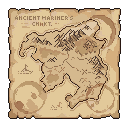
The world map and the profile of every area. Enough to know where you stand, what is reachable from there, and what an area holds before you set foot on it. Two subcommands, all tied to the same concept.
>adventure/adventure>adv>mapClick a line to copy it, then paste it in Discord.
An area's sheet: resources, activities and quirks
Shows the world map and where you stand on it
An argument in square brackets is optional, one in angle brackets is required.
What a player types, and what it does.
>map shows the world map and where you stand on it >adv information an area's sheet: resources, activities and quirks >adv information village >adv information mine  >cooldownsDisplay your current cooldowns >dailyClaim your daily reward >hourlyClaim your hourly reward
 >lootboxOpen lootboxes to get resources and items
 >macroSave and run command chains
 >moveMove to a different area
 >profileDisplay your profile
 >reputationView your reputation and give reputation points to other players
 >shrineStart a shrine ritual for 4 hours and get rewards. If you come after 5 hours, you break it.
 >spellCast spells using Dark Mana
 >topDisplay the various game leaderboards
 >tradeTrade resources or unique items with other players
 >treasureCompete globally to try to claim a treasure chest